“Soft” MARS Mod for FT-65

It turns out there is a “soft” MARS mod which will allow the owner of either radio to “open up” the transmitter to cover an expanded range. The use of such an “expanded” HT outside of the authorized amateur radio bands is a legal question left to discretion of the user.

Note: Use of this procedure is unsupported, you run the risk of possibly damaging the radio, and radio performance is not guaranteed outside the authorized amateur radio bands in your region.

To “open up” the HT, follow these simple steps, starting with the HT powered off:

  1. While pressing the PTT and MONI/T.CALL (the button directly below the PTT button) buttons, turn the radio on
  2. Use the up/down arrow keys to select ________ (Not Needed?)
  3. Carefully enter the number 62406665
  4. The radio should reset, with the transmit range expanded.

To reverse the “soft” mod, perform the exact same sequence to restore the original, limited, transmit coverage range.

Posted in How-to | Leave a comment

Action Required [FINAL NOTICE]: Email Client Hostname Update

Hello,

This is the final notice that your email address, project@n2vip.org is still sending and receiving email using outdated email hostnames that will no longer work after September 30th, 2024

Please double-check all software and devices you are using to check this email account, and update your email clients to use the current hostnames listed below as soon as possible:

Incoming:
For IMAP connections, use: imap.dreamhost.com, port 993
For POP3 connections, use: pop.dreamhost.com, port 995

Outgoing:
smtp.dreamhost.com, port 465

If you need more detailed guides, you can refer to the Knowledge Base articles below:

Any email clients, applications, etc. that are still using any hostnames other than those listed above will no longer be able to send and receive emails successfully after September 30th, 2024.

If you have any questions about this, please reach out to the account holder of this DreamHost Account. If you are the account holder for the DreamHost account on which this email address is hosted, please reach out to DreamHost Support.

-The Happy DreamHost Modernization Crew

Posted in Hamvention 2018 | Leave a comment

Don’t miss out: Dropbox Dash is here

Posted in Hamvention 2018 | Leave a comment

Meet Dropbox Dash—your universal search tool

Posted in Hamvention 2018 | Leave a comment

Updates to our Terms of Service and Privacy Policy

Posted in Hamvention 2018 | Leave a comment

Updates to our Terms of Service and Privacy Policy

Update=
s to our Terms of Service and Privacy Policy
=
=C2=A0=E2=80=8C=C2=A0=E2=80=8C=C2=A0=E2=80=8C=C2=A0=E2=80=8C=C2=A0=E2=80=8C=
=C2=A0=E2=80=8C=C2=A0=E2=80=8C=C2=A0=E2=80=8C=C2=A0=C2=A0=E2=80=8C=C2=A0=E2=
=80=8C=C2=A0=E2=80=8C=C2=A0=E2=80=8C=C2=A0=E2=80=8C=C2=A0=E2=80=8C=C2=A0=E2=
=80=8C=C2=A0=E2=80=8C=C2=A0=C2=A0=E2=80=8C=C2=A0=E2=80=8C=C2=A0=E2=80=8C=C2=
=A0=E2=80=8C=C2=A0=E2=80=8C=C2=A0=E2=80=8C=C2=A0=E2=80=8C=C2=A0=E2=80=8C=C2=
=A0=C2=A0=E2=80=8C=C2=A0=E2=80=8C=C2=A0=E2=80=8C=C2=A0=E2=80=8C=C2=A0=E2=80=
=8C=C2=A0=E2=80=8C=C2=A0=E2=80=8C=C2=A0=E2=80=8C=C2=A0=E2=80=8C=C2=A0=E2=80=
=8C=C2=A0=E2=80=8C=C2=A0=E2=80=8C=C2=A0=E2=80=8C=C2=A0=C2=A0=E2=80=8C=C2=A0=
=E2=80=8C=C2=A0=E2=80=8C=C2=A0=E2=80=8C=C2=A0=E2=80=8C=C2=A0=E2=80=8C=C2=A0=
=E2=80=8C=C2=A0=E2=80=8C=C2=A0=C2=A0=E2=80=8C=C2=A0=E2=80=8C=C2=A0=E2=80=8C=
=C2=A0=E2=80=8C=C2=A0=E2=80=8C=C2=A0=E2=80=8C=C2=A0=E2=80=8C=C2=A0=E2=80=8C=
=C2=A0=C2=A0=E2=80=8C=C2=A0=E2=80=8C=C2=A0=E2=80=8C=C2=A0=E2=80=8C=C2=A0=E2=
=80=8C=C2=A0=E2=80=8C=C2=A0=E2=80=8C=C2=A0=E2=80=8C=C2=A0=E2=80=8C=C2=A0=E2=
=80=8C=C2=A0=E2=80=8C=C2=A0=E2=80=8C=C2=A0=E2=80=8C=C2=A0=C2=A0=E2=80=8C=C2=
=A0=E2=80=8C=C2=A0=E2=80=8C=C2=A0=E2=80=8C=C2=A0=E2=80=8C=C2=A0=E2=80=8C=C2=
=A0=E2=80=8C=C2=A0=E2=80=8C=C2=A0=C2=A0=E2=80=8C=C2=A0=E2=80=8C=C2=A0=E2=80=
=8C=C2=A0=E2=80=8C=C2=A0=E2=80=8C=C2=A0=E2=80=8C=C2=A0=E2=80=8C=C2=A0=E2=80=
=8C=C2=A0=C2=A0=E2=80=8C=C2=A0=E2=80=8C=C2=A0=E2=80=8C=C2=A0=E2=80=8C=C2=A0=
=E2=80=8C=C2=A0=E2=80=8C=C2=A0=E2=80=8C=C2=A0=E2=80=8C=C2=A0=E2=80=8C=C2=A0=
=E2=80=8C=C2=A0=E2=80=8C=C2=A0=E2=80=8C=C2=A0=E2=80=8C=C2=A0=C2=A0=E2=80=8C=
=C2=A0=E2=80=8C=C2=A0=E2=80=8C=C2=A0=E2=80=8C=C2=A0=E2=80=8C=C2=A0=E2=80=8C=
=C2=A0=E2=80=8C=C2=A0=E2=80=8C=C2=A0=C2=A0=E2=80=8C=C2=A0=E2=80=8C=C2=A0=E2=
=80=8C=C2=A0=E2=80=8C=C2=A0=E2=80=8C=C2=A0=E2=80=8C=C2=A0=E2=80=8C=C2=A0=E2=
=80=8C=C2=A0=C2=A0=E2=80=8C=C2=A0=E2=80=8C=C2=A0=E2=80=8C=C2=A0=E2=80=8C=C2=
=A0=E2=80=8C=C2=A0=E2=80=8C=C2=A0=E2=80=8C=C2=A0=E2=80=8C=C2=A0=E2=80=8C=C2=
=A0=E2=80=8C=C2=A0=E2=80=8C=C2=A0=E2=80=8C=C2=A0=E2=80=8C=C2=A0=C2=A0=E2=80=
=8C=C2=A0=E2=80=8C=C2=A0=E2=80=8C=C2=A0=E2=80=8C=C2=A0=E2=80=8C=C2=A0=E2=80=
=8C=C2=A0=E2=80=8C=C2=A0=E2=80=8C=C2=A0=C2=A0=E2=80=8C=C2=A0=E2=80=8C=C2=A0=
=E2=80=8C=C2=A0=E2=80=8C=C2=A0=E2=80=8C=C2=A0=E2=80=8C=C2=A0=E2=80=8C=C2=A0=
=E2=80=8C=C2=A0

Hi Project,
We=E2=80=99re constantly looking =
for ways to improve the Dropbox experience and to ensure that our policies =
explain how our services work. So we=E2=80=99re letting you know about a fe=
w updates to our Terms of Service and Privacy Policy. Here=E2=80=99s a summ=
ary of the key changes:

=E2=80=A2

Terms of Service. We=E2=80=99ve clarified that Dropbox may only be u=
sed by those over 13 in the United States, and 16 outside of the United Sta=
tes. We=E2=80=99ve also made updates to our dispute resolution terms.

=E2=80=A2

Privacy Policy. Our goal is to make Dropbox a great place for collab=
oration with the people you work with. To support this, we=E2=80=99ve expla=
ined when collaborators and potential collaborators might see some of your =
basic information. We=E2=80=99ve also added details on our data transfer me=
chanisms and our updated process for data deletion requests.

Please take a look at the full Terms of Service and Privacy Policy, which will go into effect on Ja=
nuary 12, 2022. You can also find our previous terms here. For more details, visit our Help Center.
Thanks!
-The Dropbox Team

Posted in Hamvention 2018 | Leave a comment

Tytera MD-380 Icons

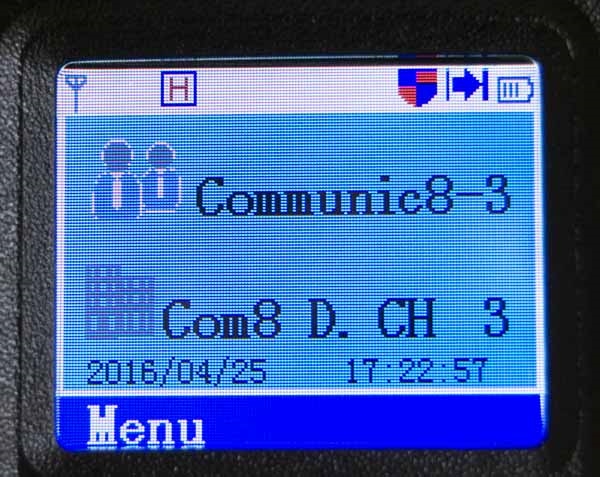
I’ve found this website to be very useful for decoding the icons on the Tytera MD-380 DMR handi-talkie when I first got it, so I figured i’d share it here. I was particularly curious about the <a href=”‘I’m with her’ icon, the arrow pointing to a vertical line. That particular icon is to indicate that transmit and receive are set to the same frequency, typical for most hotspot applications, but not for typical DMR repeater use.
I hope you find this link useful.


Link: https://radio-hire.co.uk/news/tytera-md-380-screen-icons#

Posted in Uncategorized | Leave a comment

Analysis of the G5RV Antenna

Over at the Brazos Amateur Radio Club, Rick Hiller, W5RH, has assembled a 59 page PowerPoint ‘deck’ that provides a lot of great information about this often deployed, and just as often criticized, go-to antenna for hams facing space issues when considering HF antenna options.

http://www.bvarc.org/pdf/g5rv_w5rh.pdf

Posted in Uncategorized | Leave a comment

ELK Log Periodic Tripod Mount

While at Pacificon last fall (2019) I attended an antenna seminar that had many great presenters, and when it was over, I won a door prize! While I did not win the HF Vertical, I won a an Elk 2m/440L5 Log Periodic Antenna, suitable for entry-level satellite work on the VHF and UHF bands – something I always wanted to try.

Once I flew home, I put the antenna to the side, and focused on other things, but a few weeks ago I came across the antenna, and with the weather here in Texas getting nicer, I decided to look into working satellites so I pulled the antenna out of my closet and started searching for a suitable mount. While ideally, being lazy, I was hoping to find a pre-built, inexpensive, and simple computer-controlled AZ/EL solution for the Elk antenna, what I did find was an inexpensive solution for mounting the Elk antenna on K0PIR’s website using an inexpensive Amazon Basics 60″ tripod, a 3″ bolt and a couple nuts and washers.

The parts list is down below (I went to Home Depot for my hardware, but there’s no reason to think you can’t source similar parts elsewhere), and beyond the price of the Elk 2m/440L5 antenna ($129.95) and the Amazon Basics 60″ Lightweight Tripod ($25.95), the hardware was under $5 (Three bags of hardware at $1.18/each):

Parts List:
1 piece of 3″ long 1/4″ x 20 Coarse Stainless Steel Bolt – 887480145410
3 pieces of 1/4″ Washers – 887480024814
2 pieces of 1/4″ x 20 Coarse Wing Nuts – 887480023718

Assembly is simple.

  1. Prepare the camera mount plate on the tripod by removing it, placing it on a solid surface with a hole large enough to allow the bolt to pop through the plate (if you put the plate on a flat surface, the bolt will not have enough “travel” to break free of the Camera mount plate.
  2. Take the 3″ long 1/4″ bolt, put one of the washers on it, then insert it into the hole on the camera mount plate, place another washer on the bolt (so they sandwich the camera mounting plate) and then tighten with one of the wing nuts. This will securely mount the bolt to the camera mount plate – put this aside for now.
  3. Take out your PVC mount “bar” from the Elk antenna and secure the center “T” piece with the center 1 1/2″ opening facing straight up. Making sure you are on a surface you don’t mind marking up with your drill, insert your 1/4″ drill bit into the “T”, holding the drill in the center of the opening. Start the drill slowly, carefully working up your speed until the drill “bites” the PVC and QUICKLY goes through the PVC.
  4. Place the PVC “T” on the bolt you attached to your tripod Camera Mount (See step 2, above), then place a 1/4″ washer on the bolt, then secure it with another wing nut.
  5. Attach the Elk antenna to the PVC mount “bar”, then attach the Camera Mount Plate to the tripod and enjoy!
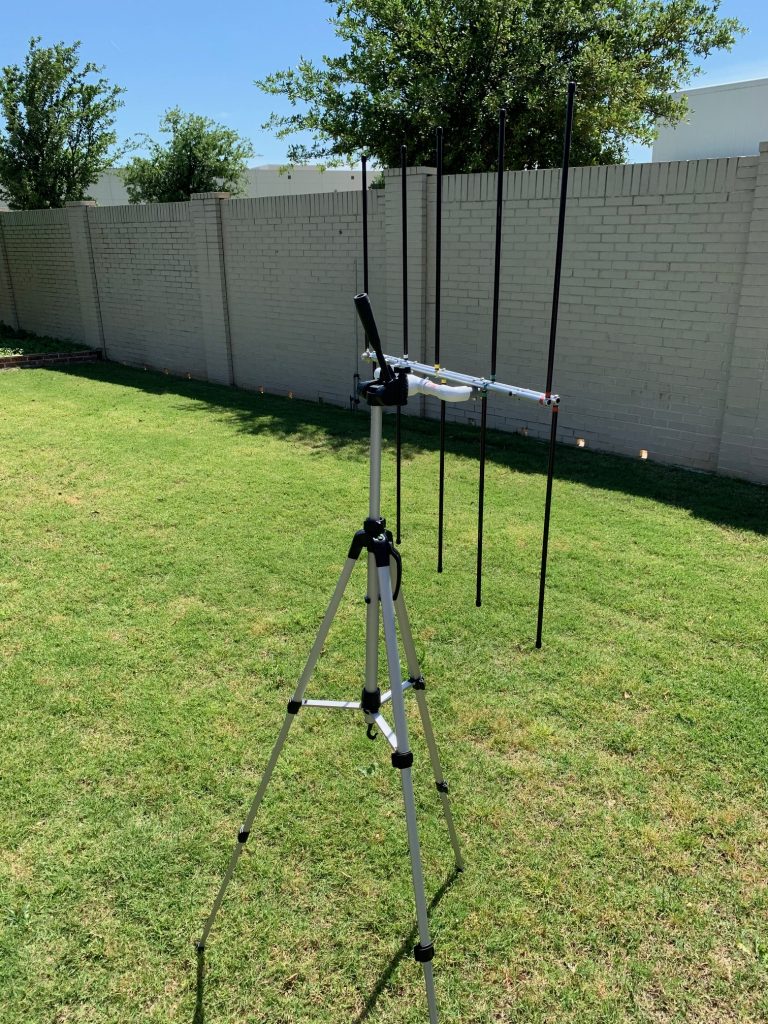
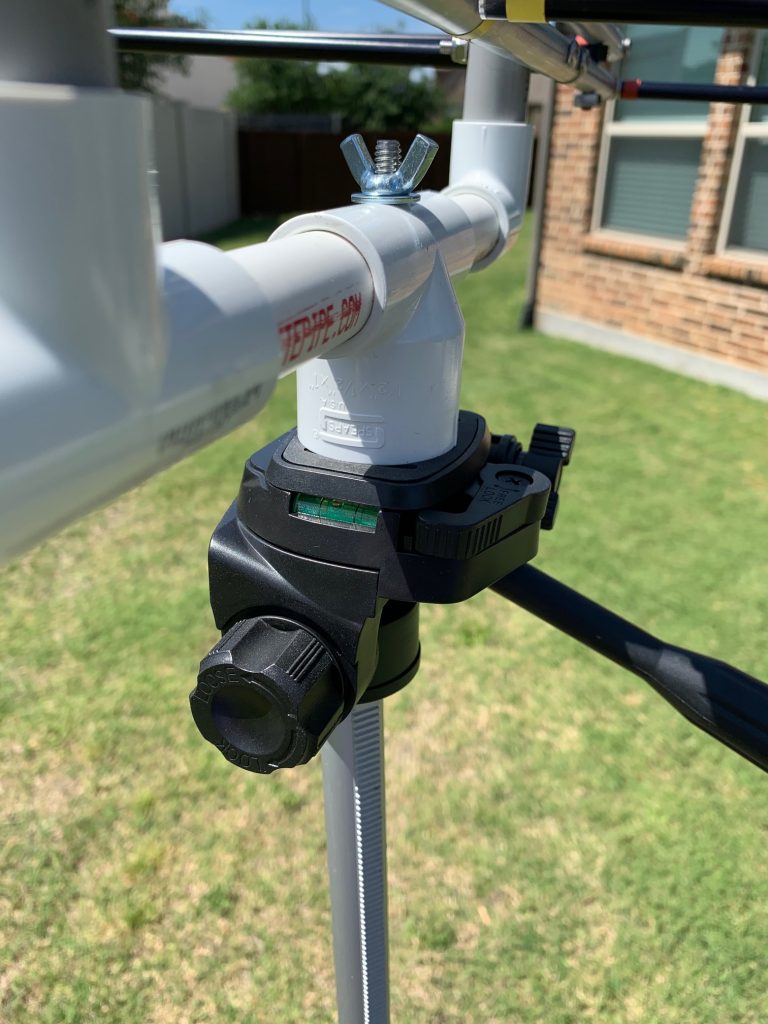
Completed Tripod with Elk 2m/440L5 Antenna, horizontal polarization
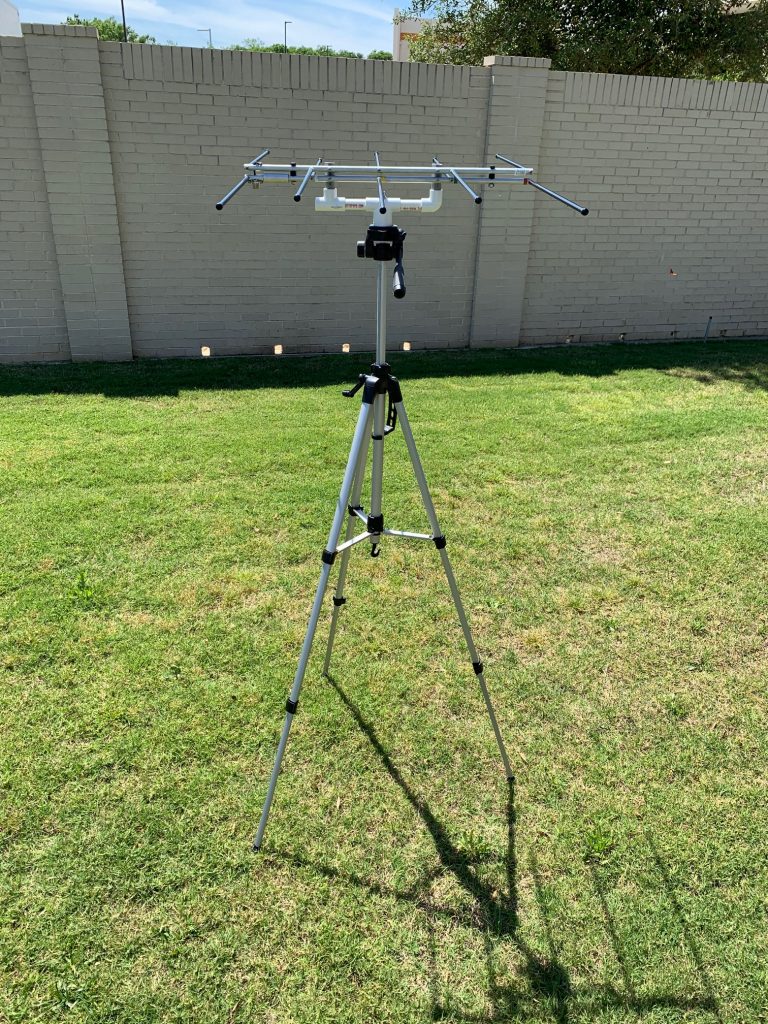
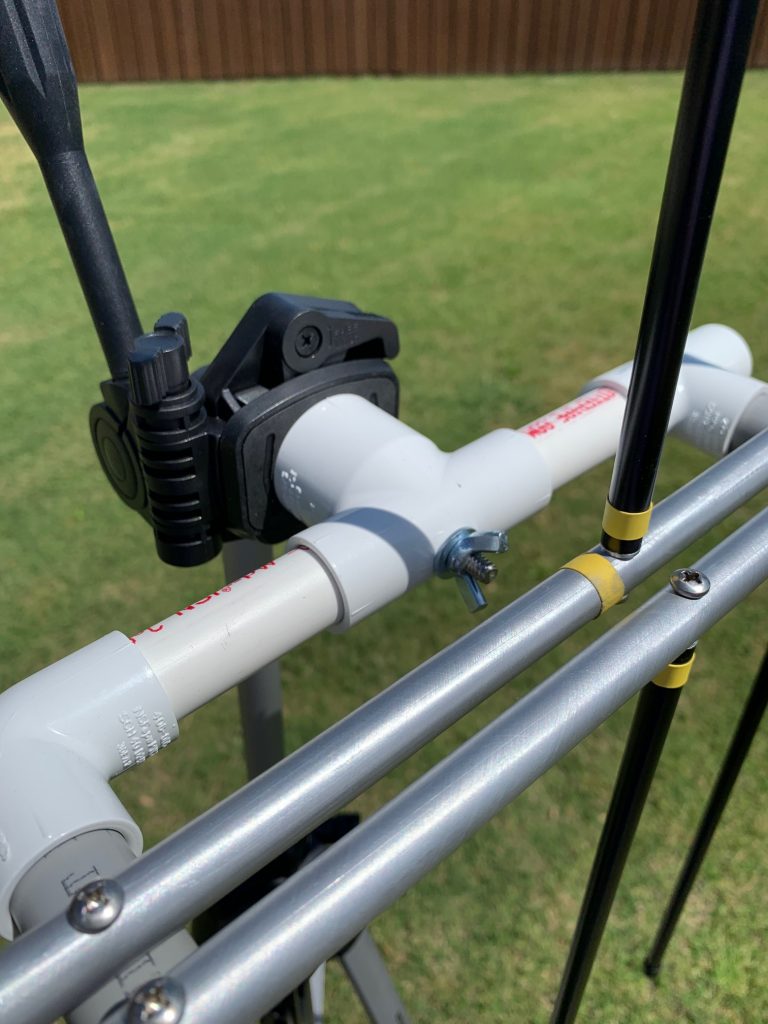
Close-up view of antenna/tripod mount, note tripod level indicator
Close-up of the mount in vertical orientation
Posted in Uncategorized | Leave a comment

Interesting End Fed Wire Matchbox

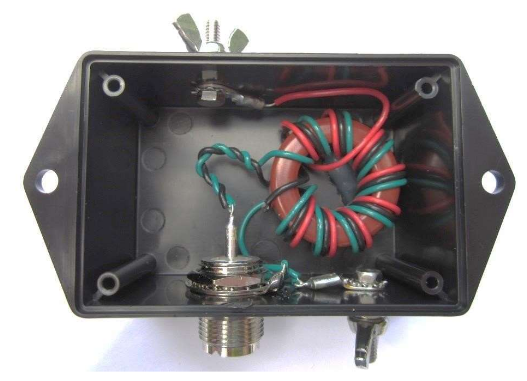
This antenna matchbox is available assembled from the Emergency Amateur Radio Club of Hawaii, or you can simply follow the construction details in the PDF. While the assembled unit appears weatherproof, I think it wold be best for temporary/portable applications.

This could be a good club build project, providing members with a pretty reasonable HF antenna, perfect for trying out FT8 or other weak-signal digital modes supported by Joe Taylor’s WSJT-X software.

The Assembled version, with a bit of wire for the radiator, is available here: http://earchi.org/proj_homebrew.html

 Assembly Instructions are available here: http://www.earchi.org/92011endfedfiles/Endfed6_40.pdf

Posted in Uncategorized | Leave a comment